
In Obsidian Git plugin version 2.36.0 I introduced Git signs and hunk commands to the editor view of Obsidian. If you want to go straight to the new feature, skip to the Signs Feature Presentation section. Otherwise, read on to learn more about the motivation and some of the implementation of the new Git signs and hunk commands.
Motivation#
As a software developer, I’m working quite a lot with text files and Git as version control. I started my work on the Git plugin for Obsidian, because I wanted to back up1/version control my notes with a system that works across platforms and I’m already familiar with. Over time I added more and more features that I already found useful in my daily work with Git in other editors like VS Code and later Neovim (I Use Neovim BTW). Some of these features are:
- Source control view
- History view
- Unified diff view
They all integrated well into Obsidian’s view system and design language, but the real integration of Git into the writing process in Obsidian was still missing. Obsidian is all about taking notes using Markdown which allows staying free from any menus and toolbars (especially with support for vim mode). So I wanted to bring Git closer to the note-taking experience in Obsidian. The first step was to introduce the split diff view, which uses an extension to the CodeMirror editor that Obsidian uses. This allowed to edit the notes directly in the diff view. But still, the user had to open a separate view to see the changes and writing your notes in such a split view is not reasonable.
There was also the Line Authoring feature that is basically a Git blame and shows who edited which line when in the gutter of the editor. This is useful to see how old a line is and in a collaborative environment who changed it last. But it does not provide any interaction or enrich the work with new changes in the editor itself.
So the next step was to bring the interaction directly into the editor view of Obsidian.
Signs#
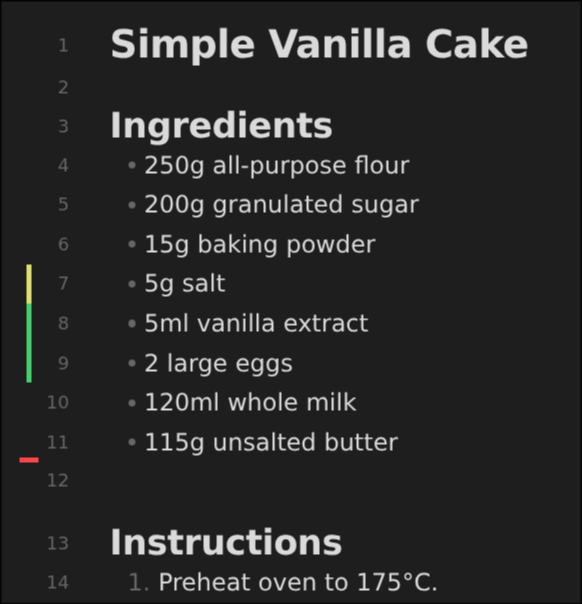
Git signs are a popular feature in other text editors like VS Code or Neovim. They show up in the gutter2 of the editor and indicate how lines were changed compared to the version in the index. There are three main types of changes:
- Added lines (green)
- Modified lines (yellow)
- Deleted lines (red)
Each chunk of change is called a hunk. The signs give a quick overview of what changed in the current file without opening a separate view.
Implementation#
Since I’m using Neovim as my main text editor and the wonderful gitsigns.nvim plugin, I took their implementation of representing and handling Hunks as a reference.
In addition to the sign types mentioned before, there is also the changedelete type which is represented as a yellow tilde.
It indicates that the hunk contains more deleted lines than added lines.
Diff#
The generation of the hunks is done by computing a diff between the current content of the note and the content in the Git index. The characteristics of a diff like structural representation, quality, and performance heavily depend on the algorithm and implementation used. I tried all the following libraries:
- diff
- Google’s diff-match-patch
- native Git diff command
- CodeMirror’s built-in diff implementation (which is based on diff-match-patch)
Many of them have multiple methods to compute diffs with different characteristics. Being able to combine many changes with different kinds right next to each other into a single hunk is one of them. However, such combination was often too aggressive and led to hunks that were not precise enough. Finding the right library and method having a good balance between precision and readability took a lot of experimentation and time.
Using the native Git diff command would have been the best choice in terms of quality, but the delay and overhead of spawning a child process for basically every change in the editor is not acceptable.
In the end, I settled with using the diff implementation from the merge extension of CodeMirror. It has multiple advantages over the other implementations:
- The diff is computed in the same way as in the existing split diff view, leading to a consistent user experience.
- It supports updating an existing diff with only the changes of a CodeMirror transaction3, leading to better performance when typing.
- Since it’s designed to be run for every keystroke, it supports other performance optimizations configuration like lowering the quality for a certain file size.
Even with using these performance optimizations the diff computation can still take over 20ms. On my device, the diff takes most of the time around 1ms, but it varies a lot by file size, content, and device performance. So I came up with a solution which utilizes the duration of the last diff computations. If the duration exceeds 16ms the diff computation is debounced until the user stops typing for a short moment to avoid blocking the main thread and leading to input lag. This has the drawback of not showing the signs immediately while typing, but overall leads to a better experience. If the content has changed and the diff was fast enough for multiple times in a row, the signs are updated immediately again.
Editor Integration#
Obsidian uses the CodeMirror 6 editor which is composed of many extensions.
Even the core parts of the editor like selection, search and history are implemented as extensions by CodeMirror itself.
This allows adding new features to the editor by writing custom extensions, which need to be registered in Obsidian via their plugin API to be then added when the editor is created.
At the core is a StateField that holds the current set of hunks and version of the file in the Git index for every editor state.
Then there is also another StateField to hold the current sign markers in the gutter which is also added as an extension.
The separation between the hunks and the markers allows the gutter to update only when the markers change, which is not the case for every hunk update (e.g. when typing inside a hunk without affecting new lines).
One issue that’s still present is the lack of showing staged changes. Everything is basically already implemented, but the diff results didn’t allow the proper representation of staged changes. Maybe this will be added in a future update (I welcome any contributions regarding this).
Signs Feature Presentation#
Both hunk features (signs and hunk commands) need to be enabled explicitly in the plugin settings. That’s because they add some overhead to the editor and most users probably don’t need them. But for experienced users working with Git on a daily basis, they are a great addition to the workflow.
Signs#
Once enabled, the signs show up in the gutter of the editor as soon as there are changes compared to the Git index.
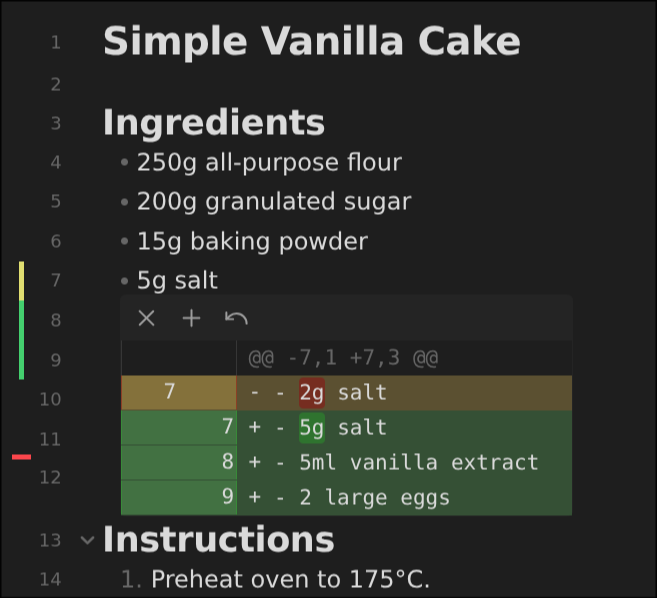
By clicking on the signs or using the command ‘Preview hunk’ a popup appears showing the changes in the hunk. It also includes buttons to stage/reset the hunk.
Hunk Commands#
Besides the previous visuals there also multiple new commands to interact with the hunks.
- ‘Stage hunk’ stages the hunk at the current cursor position.
- ‘Reset hunk’ resets the hunk at the current cursor position.
- ‘Preview hunk’ shows a popup with the changes in the hunk at the current
- ‘Go to next hunk’ moves the cursor to the next hunk
- ‘Go to previous hunk’ moves the cursor to the previous hunk
These commands allow navigating and managing your changes via hunks without leaving the editor view or even the keyboard.
It is also possible to stage/reset individual lines or multiple hunks at once from the editor by selecting them and using the respective commands.
Split Diff View#
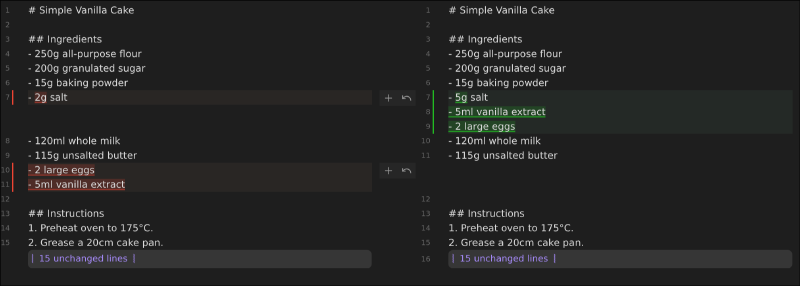
With the new hunk management it is also possible to stage/reset individual hunks directly from the split diff view.
Thank You#
The popularity of the plugin is astonishing, being the seventh most downloaded plugin with over 2 million downloads and almost 10K stars on GitHub in five years. With rising popularity there is more and more response from users e.g., via GitHub issues and pull requests with sometimes very strange edge cases and individual setups. So I want to thank everyone who reported issues, gave feedback, or contributed in any other way to the plugin.
Also thanks to chrisgrieser for testing and giving feedback on early versions of the features.
I hope you like the new features just like I do. Let me know of any feedback or issues on the GitHub repository or via mail.
Links#
Git alone is not a proper backup solution. Even with a remote repository like GitHub, make sure to have additional backups of your notes. ↩︎
The gutter is the vertical area along the left side of the editor where line numbers, folding buttons and other markers are displayed. ↩︎
Each change in the CodeMirror editor is represented as a transaction containing information about the change like the changed ranges and the new document state. So there is no need to calculate any change to the previous state manually. ↩︎